
365 lines
14 KiB
Markdown
365 lines
14 KiB
Markdown
<h1 align="center">🎬 Pixelle-Video —— AI Fully Automated Short Video Engine</h1>
|
|
|
|
<p align="center"><b>English</b> | <a href="README.md">中文</a></p>
|
|
|
|
<p align="center">
|
|
<a href="https://www.bilibili.com/video/BV1QHC7BVEq7" target="_blank"><img src="https://img.shields.io/badge/🎥 Video%20Tutorial-EA4C89" alt="Video Tutorial"></a>
|
|
<a href="https://aidc-ai.github.io/Pixelle-Video" target="_blank"><img src="https://img.shields.io/badge/📘 Documentation-4A90E2" alt="Documentation"></a>
|
|
<a href="https://github.com/AIDC-AI/Pixelle-Video/stargazers"><img src="https://img.shields.io/github/stars/AIDC-AI/Pixelle-Video.svg" alt="Stargazers"></a>
|
|
<a href="https://github.com/AIDC-AI/Pixelle-Video/issues"><img src="https://img.shields.io/github/issues/AIDC-AI/Pixelle-Video.svg" alt="Issues"></a>
|
|
<a href="https://github.com/AIDC-AI/Pixelle-Video/network/members"><img src="https://img.shields.io/github/forks/AIDC-AI/Pixelle-Video.svg" alt="Forks"></a>
|
|
<a href="https://github.com/AIDC-AI/Pixelle-Video/blob/main/LICENSE"><img src="https://img.shields.io/github/license/AIDC-AI/Pixelle-Video.svg" alt="License"></a>
|
|
</p>
|
|
|
|
Just input a **topic**, and Pixelle-Video will automatically:
|
|
- ✍️ Write video script
|
|
- 🎨 Generate AI images/videos
|
|
- 🗣️ Synthesize voice narration
|
|
- 🎵 Add background music
|
|
- 🎬 Create video with one click
|
|
|
|
|
|
**Zero threshold, zero editing experience** - Make video creation as simple as typing a sentence!
|
|
|
|
|
|
## 🖥️ Web Interface Preview
|
|
|
|

|
|
|
|
|
|
## ✨ Key Features
|
|
|
|
- ✅ **Fully Automatic Generation** - Input a topic, automatically generate complete video
|
|
- ✅ **AI Smart Copywriting** - Intelligently create narration based on topic, no need to write scripts yourself
|
|
- ✅ **AI Generated Images** - Each sentence comes with beautiful AI illustrations
|
|
- ✅ **AI Generated Videos** - Support AI video generation models (like WAN 2.1) to create dynamic video content
|
|
- ✅ **AI Generated Voice** - Support Edge-TTS, Index-TTS and many other mainstream TTS solutions
|
|
- ✅ **Background Music** - Support adding BGM to make videos more atmospheric
|
|
- ✅ **Visual Styles** - Multiple templates to choose from, create unique video styles
|
|
- ✅ **Flexible Dimensions** - Support portrait, landscape and other video dimensions
|
|
- ✅ **Multiple AI Models** - Support GPT, Qwen, DeepSeek, Ollama and more
|
|
- ✅ **Flexible Atomic Capability Combination** - Based on ComfyUI architecture, can use preset workflows or customize any capability (such as replacing image generation model with FLUX, replacing TTS with ChatTTS, etc.)
|
|
|
|
|
|
## 📊 Video Generation Pipeline
|
|
|
|
Pixelle-Video adopts a modular design, the entire video generation process is clear and concise:
|
|
|
|

|
|
|
|
From input text to final video output, the entire process is clear and simple: **Script Generation → Image Planning → Frame-by-Frame Processing → Video Composition**
|
|
|
|
Each step supports flexible customization, allowing you to choose different AI models, audio engines, visual styles, etc., to meet personalized creation needs.
|
|
|
|
|
|
## 🎬 Video Examples
|
|
|
|
Here are actual cases generated using Pixelle-Video, showcasing video effects with different themes and styles:
|
|
|
|
### 📱 Portrait Video Showcase
|
|
|
|
<table>
|
|
<tr>
|
|
<td width="33%">
|
|
<h3>🏛️ Historical & Cultural - Fixed Frame</h3>
|
|
<video src="https://github.com/user-attachments/assets/56e0a018-fa99-47eb-a97f-fc2fa8915724" controls width="100%"></video>
|
|
<p align="center"><b>Records of the Grand Historian</b></p>
|
|
</td>
|
|
<td width="33%">
|
|
<h3>💡 Personal Growth - Voice Clone</h3>
|
|
<video src="https://github.com/user-attachments/assets/1bad9a49-df83-4905-9cc8-9a7640e9c7d8" controls width="100%"></video>
|
|
<p align="center"><b>How to Improve Yourself</b></p>
|
|
</td>
|
|
<td width="33%">
|
|
<h3>🤔 Deep Thinking - Default Template</h3>
|
|
<video src="https://github.com/user-attachments/assets/663b705a-2aea-44bc-b266-4bb27aa255a8" controls width="100%"></video>
|
|
<p align="center"><b>Understanding Antifragility</b></p>
|
|
</td>
|
|
</tr>
|
|
<tr>
|
|
<td width="33%">
|
|
<h3>🌅 Emotional - Voice Clone</h3>
|
|
<video src="https://github.com/user-attachments/assets/4687df95-dd21-4a7b-b01e-f33a7b646644" controls width="100%"></video>
|
|
<p align="center"><b>Winter Sunshine</b></p>
|
|
</td>
|
|
<td width="33%">
|
|
<h3>📖 Novel Commentary - Custom Script</h3>
|
|
<video src="https://github.com/user-attachments/assets/d354465e-3fa8-40b4-93e9-61ad75ef0697" controls width="100%"></video>
|
|
<p align="center"><b>Battle Through the Heavens</b></p>
|
|
</td>
|
|
<td width="33%">
|
|
<h3>📚 Health & Wellness - Qwen Image Gen</h3>
|
|
<video src="https://github.com/user-attachments/assets/8ac21768-41ce-4d41-acdd-e3dd3eb9725a" controls width="100%"></video>
|
|
<p align="center"><b>Health Knowledge</b></p>
|
|
</td>
|
|
</tr>
|
|
</table>
|
|
|
|
### 🖥️ Landscape Video Showcase
|
|
|
|
<table>
|
|
<tr>
|
|
<td width="50%">
|
|
<h3>💰 Side Hustle Money Making - Movie Template</h3>
|
|
<video src="https://github.com/user-attachments/assets/c9209d4e-73a6-4b82-aaad-cf102248c9e2" controls width="100%"></video>
|
|
<p align="center"><b>Side Hustle Money Making</b></p>
|
|
</td>
|
|
<td width="50%">
|
|
<h3>🏛️ Historical Commentary - Custom Template</h3>
|
|
<video src="https://github.com/user-attachments/assets/a767c452-d5f1-4cff-bb34-b80fff0d4c3e" controls width="100%"></video>
|
|
<p align="center"><b>Insights from Zizhi Tongjian</b></p>
|
|
</td>
|
|
</tr>
|
|
</table>
|
|
|
|
> 💡 **Tip**: All these videos are fully automatically generated by AI just by inputting a topic keyword, without any video editing experience required!
|
|
|
|
|
|
## 🚀 Quick Start
|
|
|
|
### 🪟 Windows All-in-One Package (Recommended for Windows Users)
|
|
|
|
**No need to install Python, uv, or ffmpeg - ready to use out of the box!**
|
|
|
|
👉 **[Download Windows All-in-One Package](https://github.com/AIDC-AI/Pixelle-Video/releases/latest)**
|
|
|
|
1. Download the latest Windows All-in-One Package and extract it
|
|
2. Double-click `start.bat` to launch the Web interface
|
|
3. Browser will automatically open http://localhost:8501
|
|
4. Configure LLM API and image generation service in "⚙️ System Configuration"
|
|
5. Start generating videos!
|
|
|
|
> 💡 **Tip**: The package includes all dependencies, no need to manually install any environment. On first use, you only need to configure API keys.
|
|
|
|
|
|
### Install from Source (For macOS / Linux Users or Users Who Need Customization)
|
|
|
|
#### Prerequisites
|
|
|
|
Before starting, you need to install Python package manager `uv` and video processing tool `ffmpeg`:
|
|
|
|
##### Install uv
|
|
|
|
Please visit the uv official documentation to see the installation method for your system:
|
|
👉 **[uv Installation Guide](https://docs.astral.sh/uv/getting-started/installation/)**
|
|
|
|
After installation, run `uv --version` in the terminal to verify successful installation.
|
|
|
|
##### Install ffmpeg
|
|
|
|
**macOS**
|
|
```bash
|
|
brew install ffmpeg
|
|
```
|
|
|
|
**Ubuntu / Debian**
|
|
```bash
|
|
sudo apt update
|
|
sudo apt install ffmpeg
|
|
```
|
|
|
|
**Windows**
|
|
- Download URL: https://ffmpeg.org/download.html
|
|
- After downloading, extract and add the `bin` directory to the system environment variable PATH
|
|
|
|
After installation, run `ffmpeg -version` in the terminal to verify successful installation.
|
|
|
|
|
|
#### Step 1: Clone Project
|
|
|
|
```bash
|
|
git clone https://github.com/AIDC-AI/Pixelle-Video.git
|
|
cd Pixelle-Video
|
|
```
|
|
|
|
#### Step 2: Launch Web Interface
|
|
|
|
```bash
|
|
# Run with uv (recommended, will automatically install dependencies)
|
|
uv run streamlit run web/app.py
|
|
```
|
|
|
|
Browser will automatically open http://localhost:8501
|
|
|
|
#### Step 3: Configure in Web Interface
|
|
|
|
On first use, expand the "⚙️ System Configuration" panel and fill in:
|
|
- **LLM Configuration**: Select AI model (such as Qwen, GPT, etc.) and enter API Key
|
|
- **Image Configuration**: If you need to generate images, configure ComfyUI address or RunningHub API Key
|
|
|
|
After configuration, click "Save Configuration", and you can start generating videos!
|
|
|
|
|
|
## 💻 Usage
|
|
|
|
After opening the Web interface, you will see a three-column layout. Here's a detailed explanation of each part:
|
|
|
|
|
|
### ⚙️ System Configuration (Required on First Use)
|
|
|
|
Configuration is required on first use. Click to expand the "⚙️ System Configuration" panel:
|
|
|
|
#### 1. LLM Configuration (Large Language Model)
|
|
Used for generating video scripts.
|
|
|
|
**Quick Select Preset**
|
|
- Select preset model from dropdown menu (Qwen, GPT-4o, DeepSeek, etc.)
|
|
- After selection, base_url and model will be automatically filled
|
|
- Click "🔑 Get API Key" link to register and obtain key
|
|
|
|
**Manual Configuration**
|
|
- API Key: Enter your key
|
|
- Base URL: API address
|
|
- Model: Model name
|
|
|
|
#### 2. Image Configuration
|
|
Used for generating video images.
|
|
|
|
**Local Deployment (Recommended)**
|
|
- ComfyUI URL: Local ComfyUI service address (default http://127.0.0.1:8188)
|
|
- Click "Test Connection" to confirm service is available
|
|
|
|
**Cloud Deployment**
|
|
- RunningHub API Key: Cloud image generation service key
|
|
|
|
After configuration, click "Save Configuration".
|
|
|
|
|
|
### 📝 Content Input (Left Column)
|
|
|
|
#### Generation Mode
|
|
- **AI Generated Content**: Input topic, AI automatically creates script
|
|
- Suitable for: Want to quickly generate video, let AI write script
|
|
- Example: "Why develop a reading habit"
|
|
- **Fixed Script Content**: Directly input complete script, skip AI creation
|
|
- Suitable for: Already have ready-made script, directly generate video
|
|
|
|
#### Background Music (BGM)
|
|
- **No BGM**: Pure voice narration
|
|
- **Built-in Music**: Select preset background music (such as default.mp3)
|
|
- **Custom Music**: Put your music files (MP3/WAV, etc.) in the `bgm/` folder
|
|
- Click "Preview BGM" to preview music
|
|
|
|
|
|
### 🎤 Voice Settings (Middle Column)
|
|
|
|
#### TTS Workflow
|
|
- Select TTS workflow from dropdown menu (supports Edge-TTS, Index-TTS, etc.)
|
|
- System will automatically scan TTS workflows in the `workflows/` folder
|
|
- If you know ComfyUI, you can customize TTS workflows
|
|
|
|
#### Reference Audio (Optional)
|
|
- Upload reference audio file for voice cloning (supports MP3/WAV/FLAC and other formats)
|
|
- Suitable for TTS workflows that support voice cloning (such as Index-TTS)
|
|
- Can listen directly after upload
|
|
|
|
#### Preview Function
|
|
- Enter test text, click "Preview Voice" to listen to the effect
|
|
- Supports using reference audio for preview
|
|
|
|
|
|
### 🎨 Visual Settings (Middle Column)
|
|
|
|
#### Image Generation
|
|
Determine what style of images AI generates.
|
|
|
|
**ComfyUI Workflow**
|
|
- Select image generation workflow from dropdown menu
|
|
- Supports local deployment (selfhost) and cloud (RunningHub) workflows
|
|
- Default uses `image_flux.json`
|
|
- If you know ComfyUI, you can put your own workflows in the `workflows/` folder
|
|
|
|
**Image Dimensions**
|
|
- Set width and height of generated images (unit: pixels)
|
|
- Default 1024x1024, can be adjusted as needed
|
|
- Note: Different models have different dimension limitations
|
|
|
|
**Prompt Prefix**
|
|
- Controls overall image style (language needs to be English)
|
|
- Example: Minimalist black-and-white matchstick figure style illustration, clean lines, simple sketch style
|
|
- Click "Preview Style" to test effect
|
|
|
|
#### Video Template
|
|
Determines video layout and design.
|
|
|
|
**Template Naming Convention**
|
|
- `static_*.html`: Static templates (no AI-generated media, text-only styles)
|
|
- `image_*.html`: Image templates (uses AI-generated images as background)
|
|
- `video_*.html`: Video templates (uses AI-generated videos as background)
|
|
|
|
**Usage**
|
|
- Select template from dropdown menu, displayed grouped by dimension (portrait/landscape/square)
|
|
- Click "Preview Template" to test effect with custom parameters
|
|
- If you know HTML, you can create your own templates in the `templates/` folder
|
|
- 🔗 [View All Template Previews](https://aidc-ai.github.io/Pixelle-Video/user-guide/templates/#built-in-template-preview)
|
|
|
|
|
|
### 🎬 Generate Video (Right Column)
|
|
|
|
#### Generate Button
|
|
- After configuring all parameters, click "🎬 Generate Video"
|
|
- Shows real-time progress (generating script → generating images → synthesizing voice → composing video)
|
|
- Automatically shows video preview after completion
|
|
|
|
#### Progress Display
|
|
- Shows current step in real-time
|
|
- Example: "Frame 3/5 - Generating Image"
|
|
|
|
#### Video Preview
|
|
- Automatically plays after generation
|
|
- Shows video duration, file size, number of frames, etc.
|
|
- Video files are saved in the `output/` folder
|
|
|
|
|
|
### ❓ FAQ
|
|
|
|
**Q: How long does it take to use for the first time?**
|
|
A: Generation time depends on the number of video frames, network conditions, and AI inference speed, typically completed within a few minutes.
|
|
|
|
**Q: What if I'm not satisfied with the video?**
|
|
A: You can try:
|
|
1. Change LLM model (different models have different script styles)
|
|
2. Adjust image dimensions and prompt prefix (change image style)
|
|
3. Change TTS workflow or upload reference audio (change voice effect)
|
|
4. Try different video templates and dimensions
|
|
|
|
**Q: What about the cost?**
|
|
A: **This project fully supports free operation!**
|
|
|
|
- **Completely Free Solution**: LLM using Ollama (local) + ComfyUI local deployment = 0 cost
|
|
- **Recommended Solution**: LLM using Qwen (extremely low cost, highly cost-effective) + ComfyUI local deployment
|
|
- **Cloud Solution**: LLM using OpenAI + Image using RunningHub (higher cost but no need for local environment)
|
|
|
|
**Selection Suggestion**: If you have a local GPU, recommend completely free solution, otherwise recommend using Qwen (cost-effective)
|
|
|
|
|
|
## 🤝 Referenced Projects
|
|
|
|
Pixelle-Video design is inspired by the following excellent open-source projects:
|
|
|
|
- [Pixelle-MCP](https://github.com/AIDC-AI/Pixelle-MCP) - ComfyUI MCP server, allows AI assistants to directly call ComfyUI
|
|
- [MoneyPrinterTurbo](https://github.com/harry0703/MoneyPrinterTurbo) - Excellent video generation tool
|
|
- [NarratoAI](https://github.com/linyqh/NarratoAI) - Film commentary automation tool
|
|
- [MoneyPrinterPlus](https://github.com/ddean2009/MoneyPrinterPlus) - Video creation platform
|
|
- [ComfyKit](https://github.com/puke3615/ComfyKit) - ComfyUI workflow wrapper library
|
|
|
|
Thanks for the open-source spirit of these projects! 🙏
|
|
|
|
|
|
## 📢 Feedback and Support
|
|
|
|
- 🐛 **Encountered Issues**: Submit [Issue](https://github.com/AIDC-AI/Pixelle-Video/issues)
|
|
- 💡 **Feature Suggestions**: Submit [Feature Request](https://github.com/AIDC-AI/Pixelle-Video/issues)
|
|
- ⭐ **Give a Star**: If this project helps you, feel free to give a Star for support!
|
|
|
|
|
|
## 📝 License
|
|
|
|
This project is released under the Apache License 2.0. For details, please see the [LICENSE](LICENSE) file.
|
|
|
|
|
|
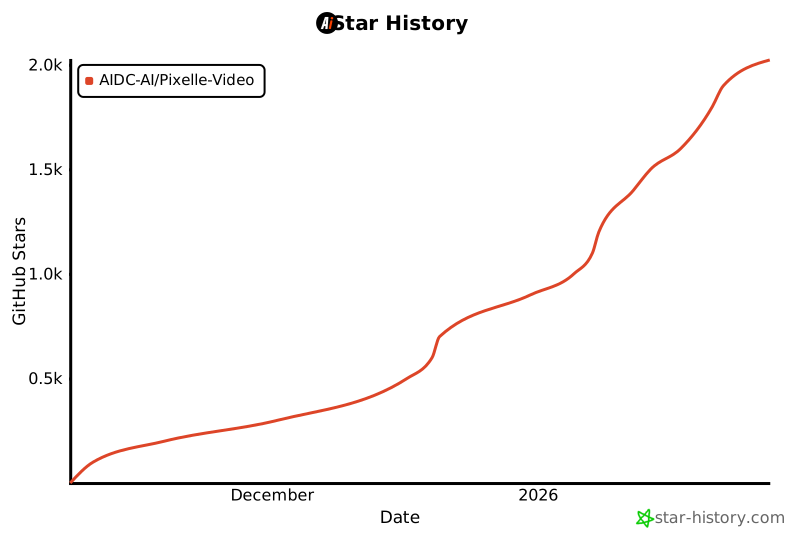
## ⭐ Star History
|
|
|
|
[](https://star-history.com/#AIDC-AI/Pixelle-Video&Date)
|
|
|