

🦞 CLAWDBOT — Personal AI Assistant
EXFOLIATE! EXFOLIATE!




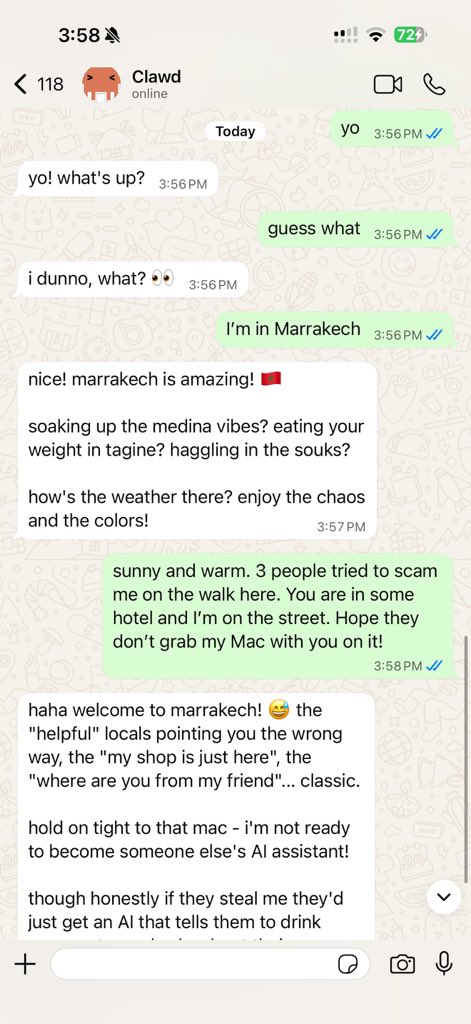
Clawdbot is a personal AI assistant you run on your own devices. It answers you on the surfaces you already use (WhatsApp, Telegram, Slack, Discord, Signal, iMessage, WebChat), can speak and listen on macOS/iOS/Android, and can render a live Canvas you control. The Gateway is just the control plane — the product is the assistant.
If you want a personal, single-user assistant that feels local, fast, and always-on, this is it.
Website: https://clawdbot.com · Docs: https://docs.clawdbot.com · FAQ: https://docs.clawdbot.com/faq · Wizard: https://docs.clawdbot.com/wizard · Nix: https://github.com/clawdbot/nix-clawdbot · Docker: https://docs.clawdbot.com/docker · Discord: https://discord.gg/clawd
Preferred setup: run the onboarding wizard (clawdbot onboard). It walks through gateway, workspace, providers, and skills. The CLI wizard is the recommended path and works on macOS, Windows, and Linux.
Subscriptions (OAuth):
- Anthropic (Claude Pro/Max)
- OpenAI (ChatGPT/Codex)
Model note: while any model is supported, I strongly recommend Anthropic Pro/Max (100/200) + Opus 4.5 for long‑context strength and better prompt‑injection resistance. See Onboarding.
Recommended setup (from source)
Do not download prebuilt binaries. Build from source.
# Clone this repo
git clone https://github.com/clawdbot/clawdbot.git
cd clawdbot

pnpm install
pnpm build
pnpm ui:build
pnpm clawdbot onboard
Quick start (from source)
Runtime: Node ≥22 + pnpm.
pnpm install
pnpm build
pnpm ui:build

# Recommended: run the onboarding wizard
pnpm clawdbot onboard

# Link WhatsApp (stores creds in ~/.clawdbot/credentials)
pnpm clawdbot login

# Start the gateway
pnpm clawdbot gateway --port 18789 --verbose

# Dev loop (auto-reload on TS changes)
pnpm gateway:watch

# Send a message
pnpm clawdbot send --to +1234567890 --message "Hello from Clawdbot"

# Talk to the assistant (optionally deliver back to WhatsApp/Telegram/Slack/Discord)
pnpm clawdbot agent --message "Ship checklist" --thinking high
Upgrading? clawdbot doctor.
If you run from source, prefer pnpm clawdbot … (not global clawdbot).
Highlights
- Local-first Gateway — single control plane for sessions, providers, tools, and events.
- Multi-surface inbox — WhatsApp, Telegram, Slack, Discord, Signal, iMessage, WebChat, macOS, iOS/Android.
- Voice Wake + Talk Mode — always-on speech for macOS/iOS/Android with ElevenLabs.
- Live Canvas — agent-driven visual workspace with A2UI.
- First-class tools — browser, canvas, nodes, cron, sessions, and Discord/Slack actions.
- Companion apps — macOS menu bar app + iOS/Android nodes.
- Onboarding + skills — wizard-driven setup with bundled/managed/workspace skills.
Everything we built so far
Core platform
- Gateway WS control plane with sessions, presence, config, cron, webhooks, Control UI, and Canvas host.
- CLI surface: gateway, agent, send, wizard, doctor, and TUI.
- Pi agent runtime in RPC mode with tool streaming and block streaming.
- Session model:
mainfor direct chats, group isolation, activation modes, queue modes, reply-back. Group rules: Groups. - Media pipeline: images/audio/video, transcription hooks, size caps, temp file lifecycle. Audio details: Audio.
Surfaces + providers
- Providers: WhatsApp (Baileys), Telegram (grammY), Slack (Bolt), Discord (discord.js), Signal (signal-cli), iMessage (imsg), WebChat.
- Group routing: mention gating, reply tags, per-surface chunking and routing. Surface rules: Surface routing.
Apps + nodes
- macOS app: menu bar control plane, Voice Wake/PTT, Talk Mode overlay, WebChat, debug tools, remote gateway control.
- iOS node: Canvas, Voice Wake, Talk Mode, camera, screen recording, Bonjour pairing.
- Android node: Canvas, Talk Mode, camera, screen recording, optional SMS.
- macOS node mode: system.run/notify + canvas/camera exposure.
Tools + automation
- Browser control: dedicated clawd Chrome/Chromium, snapshots, actions, uploads, profiles.
- Canvas: A2UI push/reset, eval, snapshot.
- Nodes: camera snap/clip, screen record, location.get, notifications.
- Cron + wakeups; webhooks; Gmail Pub/Sub.
- Skills platform: bundled, managed, and workspace skills with install gating + UI.
Ops + packaging
- Control UI + WebChat served directly from the Gateway.
- Tailscale Serve/Funnel or SSH tunnels with token/password auth.
- Nix mode for declarative config; Docker-based installs.
- Doctor migrations, logging, release tooling: Releasing.
How it works (short)
WhatsApp / Telegram / Slack / Discord / Signal
iMessage / WebChat
               │
               ▼
┌───────────────────────────────┐
│            Gateway            │  ws://127.0.0.1:18789
│       (control plane)         │  bridge: tcp://0.0.0.0:18790
└──────────────┬────────────────┘
               │
               ├─ Pi agent (RPC)
               ├─ CLI (clawdbot …)
               ├─ WebChat UI
               ├─ macOS app
               └─ iOS/Android nodes
Key subsystems
- Gateway WebSocket network — single WS control plane for clients, tools, and events (plus ops: Gateway runbook).
- Tailscale exposure — Serve/Funnel for the Gateway dashboard + WS (remote access: Remote).
- Browser control — clawd‑managed Chrome/Chromium with CDP control.
- Canvas + A2UI — agent‑driven visual workspace (A2UI host: Canvas/A2UI).
- Voice Wake + Talk Mode — always‑on speech and continuous conversation.
- Nodes — Canvas, camera snap/clip, screen record,
location.get, notifications, plus macOS‑onlysystem.run/system.notify.
Skills registry (ClawdHub)
ClawdHub is a minimal skill registry. With ClawdHub enabled, the agent can search for skills automatically and pull in new ones as needed.
Chat commands
Send these in WhatsApp/Telegram/Slack/WebChat (group commands are owner-only):
/status— health + session info (group shows activation mode)/newor/reset— reset the session/think <level>— off|minimal|low|medium|high/verbose on|off/restart— restart the gateway (owner-only in groups)/activation mention|always— group activation toggle (groups only)
macOS app (optional)
The Gateway alone delivers a great experience. All apps are optional and add extra features.
If you plan to build/run companion apps, initialize submodules first:
git submodule update --init --recursive
macOS (Clawdbot.app) (optional)
- Menu bar control for the Gateway and health.
- Voice Wake + push-to-talk overlay.
- WebChat + debug tools.
- Remote gateway control over SSH.
Build/run: ./scripts/restart-mac.sh (packages + launches).
iOS node (optional)
- Pairs as a node via the Bridge.
- Voice trigger forwarding + Canvas surface.
- Controlled via
clawdbot nodes ….
Runbook: iOS connect.
Android node (optional)
- Pairs via the same Bridge + pairing flow as iOS.
- Exposes Canvas, Camera, and Screen capture commands.
- Runbook: Android connect.
Agent workspace + skills
- Workspace root:
~/clawd(configurable viaagent.workspace). - Injected prompt files:
AGENTS.md,SOUL.md,TOOLS.md. - Skills:
~/clawd/skills/<skill>/SKILL.md.
Configuration
Minimal ~/.clawdbot/clawdbot.json (model + defaults):
{
  agent: {
    model: "anthropic/claude-opus-4-5"
  }
}
Full configuration reference (all keys + examples).
Security model (important)
- Default: tools run on the host for the main session, so the agent has full access when it’s just you.
- Group/channel safety: set
agent.sandbox.mode: "non-main"to run non‑main sessions (groups/channels) inside per‑session Docker sandboxes; bash then runs in Docker for those sessions. - Sandbox defaults: allowlist
bash,process,read,write,edit; denylistbrowser,canvas,nodes,cron,discord,gateway.
Details: Security guide · Docker + sandboxing · Sandbox config
- Link the device:
pnpm clawdbot login(stores creds in~/.clawdbot/credentials). - Allowlist who can talk to the assistant via
whatsapp.allowFrom.
Telegram
- Set
TELEGRAM_BOT_TOKENortelegram.botToken(env wins). - Optional: set
telegram.groups(withtelegram.groups."*".requireMention),telegram.allowFrom, ortelegram.webhookUrlas needed.
{
  telegram: {
    botToken: "123456:ABCDEF"
  }
}
Slack
- Set
SLACK_BOT_TOKEN+SLACK_APP_TOKEN(orslack.botToken+slack.appToken).
Discord
- Set
DISCORD_BOT_TOKENordiscord.token(env wins). - Optional: set
discord.slashCommand,discord.dm.allowFrom,discord.guilds, ordiscord.mediaMaxMbas needed.
{
  discord: {
    token: "1234abcd"
  }
}
Signal
- Requires
signal-cliand asignalconfig section.
iMessage
- macOS only; Messages must be signed in.
WebChat
- Uses the Gateway WebSocket; no separate WebChat port/config.
Browser control (optional):
{
  browser: {
    enabled: true,
    controlUrl: "http://127.0.0.1:18791",
    color: "#FF4500"
  }
}
Docs
- Start with the docs index for navigation and “what’s where.”
- Read the architecture overview for the gateway + protocol model.
- Use the full configuration reference when you need every key and example.
- Run the Gateway by the book with the operational runbook.
- Learn how the Control UI/Web surfaces work and how to expose them safely.
- Understand remote access over SSH tunnels or tailnets.
- Follow the onboarding wizard flow for a guided setup.
- Wire external triggers via the webhook surface.
- Set up Gmail Pub/Sub triggers.
- Learn the macOS menu bar companion details.
- Platform guides: Windows, Linux, macOS, iOS, Android
- Debug common failures with the troubleshooting guide.
- Review security guidance before exposing anything.
Email hooks (Gmail)
Gmail Pub/Sub wiring (gcloud + gogcli), hook tokens, and auto-watch behavior are documented here.
Gateway auto-starts the watcher when hooks.enabled=true and hooks.gmail.account is set; clawdbot hooks gmail run is the manual daemon wrapper if you don’t want auto-start.
clawdbot hooks gmail setup --account you@gmail.com
clawdbot hooks gmail run
Clawd
Clawdbot was built for Clawd, a space lobster AI assistant. 🦞
by Peter Steinberger and the community.
Community
See CONTRIBUTING.md for guidelines, maintainers, and how to submit PRs.
AI/vibe-coded PRs welcome! 🤖
Thanks to everyone who has contributed:


